
Plugin
HyOptimizer
.png) By
HytaleLibrary
By
HytaleLibrary

About this Plugin
📖 Overview
HyOptimizer is a streamlined utility plugin meticulously crafted to address the two primary hurdles of server management: Console Clutter and Memory Exhaustion.
By integrating intelligent log filtration with a proactive, automated memory recovery scheduler, HyOptimizer ensures your server logs remain readable and your RAM usage stays lean, providing a stable environment for your community.
✨ Key Features
1. 🧹 Intelligent Log Filtration
Stop drowning in endless [WARN] and [SEVERE] notifications regarding "missing assets" or "unrecognized keys." HyOptimizer monitors the server’s output stream and hides specific messages based on your personal settings.
Out-of-the-Box Support: Automatically configured to silence common technical spam.
Custom Filters: Easily define your own Regex patterns in config.json to suppress any specific log entry you wish to ignore.
2. 🧠 Proactive Memory Management
Server environments often accumulate massive amounts of temporary data that can bottleneck performance.
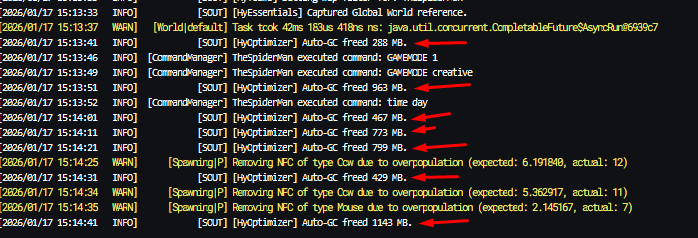
Automated Cleanup: The plugin executes a background task (defaulting to every 10 seconds) to prompt the system to release unused memory.
Efficiency Insights: Receive real-time feedback on how much RAM was recovered during each cycle (e.g., [HyOptimizer] Auto-GC freed 2070 MB.).
The Benefit: Maintains a low memory footprint and prevents the application from locking up unnecessary RAM.
3. ⚡ Lightweight Integration
Designed for high performance, the plugin operates seamlessly in the background without impacting server stability or gameplay.
⚙️ Configuration (mods/HyOptimizer/config.json)
You have total authority over how the plugin operates through a simple JSON setup.
JSON
{
"autoGcIntervalSeconds": 10, // Frequency of memory cleanup tasks.
"blockedPatterns": [ // List of text patterns to hide from the console
"missing or invalid manifest.json",
"Unused key\\(s\\) in",
"Duplicate export name",
"Attempted to store sync data"
]
}
📥 Installation
Shut down your server.
Place the HyOptimizer.jar file into the mods directory.
Restart your server.
Complete! The plugin will generate its configuration file and begin optimization immediately.
❓ Why use HyOptimizer?
In active development environments, engines log every minor detail—from missing textures to variable inconsistencies. This constant stream of "noise" makes it nearly impossible to identify critical errors within your own custom scripts.
HyOptimizer restores clarity to your console, allowing you to focus on building your world and refining your content without the distractions.
HyOptimizer is a streamlined utility plugin meticulously crafted to address the two primary hurdles of server management: Console Clutter and Memory Exhaustion.
By integrating intelligent log filtration with a proactive, automated memory recovery scheduler, HyOptimizer ensures your server logs remain readable and your RAM usage stays lean, providing a stable environment for your community.
✨ Key Features
1. 🧹 Intelligent Log Filtration
Stop drowning in endless [WARN] and [SEVERE] notifications regarding "missing assets" or "unrecognized keys." HyOptimizer monitors the server’s output stream and hides specific messages based on your personal settings.
Out-of-the-Box Support: Automatically configured to silence common technical spam.
Custom Filters: Easily define your own Regex patterns in config.json to suppress any specific log entry you wish to ignore.
2. 🧠 Proactive Memory Management
Server environments often accumulate massive amounts of temporary data that can bottleneck performance.
Automated Cleanup: The plugin executes a background task (defaulting to every 10 seconds) to prompt the system to release unused memory.
Efficiency Insights: Receive real-time feedback on how much RAM was recovered during each cycle (e.g., [HyOptimizer] Auto-GC freed 2070 MB.).
The Benefit: Maintains a low memory footprint and prevents the application from locking up unnecessary RAM.
3. ⚡ Lightweight Integration
Designed for high performance, the plugin operates seamlessly in the background without impacting server stability or gameplay.
⚙️ Configuration (mods/HyOptimizer/config.json)
You have total authority over how the plugin operates through a simple JSON setup.
JSON
{
"autoGcIntervalSeconds": 10, // Frequency of memory cleanup tasks.
"blockedPatterns": [ // List of text patterns to hide from the console
"missing or invalid manifest.json",
"Unused key\\(s\\) in",
"Duplicate export name",
"Attempted to store sync data"
]
}
📥 Installation
Shut down your server.
Place the HyOptimizer.jar file into the mods directory.
Restart your server.
Complete! The plugin will generate its configuration file and begin optimization immediately.
❓ Why use HyOptimizer?
In active development environments, engines log every minor detail—from missing textures to variable inconsistencies. This constant stream of "noise" makes it nearly impossible to identify critical errors within your own custom scripts.
HyOptimizer restores clarity to your console, allowing you to focus on building your world and refining your content without the distractions.
At a Glance
- Updated Sep 15, 2026
- Version v1.0.0
- Downloads 151
Comments ( 0)
No comments yet. Be the first!